
Buying web development services can feel deceptively simple until you start comparing proposals, timelines, and "what's included." One vendor promises a fast launch, another emphasizes custom code, and a third bundles hosting and support. Without a practical framework, it is easy to overpay, underspecify the work, or end up with a site you cannot maintain.
This guide is built for buyers (founders, marketing leads, ops managers) who need to hire a reliable web partner and want fewer surprises: clearer scope, better proposals, and a smoother launch.
What "web development services" actually include (and what they do not)
Web development services typically cover the technical work required to plan, build, test, launch, and maintain a website or web application. But different teams draw the line in different places. Before you evaluate vendors, align on these common categories.
Core build work
- Discovery and requirements (goals, pages, features, integrations)
- UI implementation (turning designs into responsive pages)
- Backend development (databases, authentication, APIs, admin tools)
- CMS setup or custom admin (so your team can edit content)
- QA and launch (testing, migration, DNS, go-live)
Often included (but not always)
- SEO fundamentals (technical SEO, metadata patterns, redirects)
- Performance optimization (speed, caching, Core Web Vitals)
- Security hardening (secure configs, dependency updates, WAF setup)
- Accessibility improvements (keyboard navigation, color contrast, labels)
- Analytics and conversion tracking (GA4, pixels, events)
Commonly excluded unless you ask
- Copywriting and content entry at scale
- Branding and full visual identity
- Photography, video, and illustrations
- Ongoing maintenance and support retainers
- Complex data integrations (ERP, custom CRMs) beyond basic connectors
A vendor can be excellent and still exclude items you assumed were standard. Your job as the buyer is to make expectations explicit.
Start with outcomes: what you need the website to do
The fastest way to compare web development services is to define success in plain business terms, then translate it into features.
Examples of outcome-driven requirements:
- Generate qualified leads: fast landing pages, clear CTAs, form routing, CRM integration, conversion tracking.
- Sell online: product catalog, inventory rules, taxes/shipping, fraud prevention, PCI-compliant payments.
- Reduce support load: searchable help content, customer portals, account management.
- Recruit and build credibility: strong performance, accessibility, security signals, polished UX.
A useful internal prompt is: "If this project works, what will improve in 90 days?" That answer becomes your vendor scorecard.
The 5 project types that change what you should buy
Not all "web development services" are the same. Identify your project type early because it affects team composition, tech choices, and budget.
Marketing website (brand + lead generation)
Best fit when your main goal is credibility, clarity, speed, and conversion tracking. The risk is overbuilding. Prioritize content structure, performance, SEO foundations, and maintainability.
CMS-driven content site (blog, resources, multi-page)
Best fit when your team publishes frequently. Prioritize editorial workflows, roles/permissions, templates, redirects, and search.
E-commerce
Best fit when checkout, catalog, and operations matter. Prioritize payment and tax handling, product data quality, performance, and post-launch iteration.
Web application (portals, dashboards, internal tools)
Best fit when users log in and do work. Prioritize authentication, authorization, audit logs, data modeling, and QA automation.
Hybrid (website + web app)
Common for growing businesses (public marketing site plus client portal). Prioritize clean separation of concerns, shared design system, and a long-term maintenance plan.
How to choose the right provider model (agency vs freelancer vs in-house)
There is no universally "best" option. Choose the model that matches your risk tolerance, complexity, and internal capacity.
| Provider model | Best for | Strengths | Watch-outs |
|---|---|---|---|
| Freelancer | Small, well-defined builds | Cost-effective, direct communication | Bus factor (availability), limited breadth (design, QA, security) |
| Specialized boutique agency | Most SMB and mid-market projects | Balanced team (strategy, design, dev), reliable delivery | Higher cost than solo, scope must be clear |
| Large agency | Complex programs, many stakeholders | Process maturity, scale, governance | Overhead, slower iteration, not ideal for simple sites |
| In-house team | Continuous product development | Deep context, fast iteration | Hiring and management cost, coverage gaps (design, DevOps) |
If you do not have a technical lead internally, a team that can own both delivery and post-launch support is often the safest path.
The buyer's checklist: deliverables you should see in a solid proposal
Ask vendors to describe deliverables, not just activities. "We do SEO" is vague. "We deliver a redirect map and technical SEO checks before launch" is verifiable.
| Area | Deliverable examples you can verify | Why it matters |
|---|---|---|
| Scope | Page list, feature list, integration list, assumptions | Prevents surprises and scope creep |
| UX/UI | Wireframes (if needed), design system basics, responsive states | Avoids rework and inconsistent pages |
| Development | Tech approach, environments (dev/staging/prod), code ownership | Impacts stability and future changes |
| SEO basics | Metadata rules, sitemap/robots, redirects, structured data plan | Protects traffic and launch performance |
| Performance | Speed targets and optimization plan | Affects conversions and SEO |
| Security | Hardening steps aligned to common risks | Reduces breach and downtime risk |
| Accessibility | Target level and testing method | Reduces legal and usability risk |
| Analytics | Measurement plan (events, forms, calls), QA checklist | Proves ROI and guides iteration |
| Training | Admin walkthrough, documentation | Ensures your team can operate the site |
| Support | Warranty period, maintenance options, response times | Prevents "launch and disappear" |
For security and web app work, it is reasonable to ask how they align with widely used guidance like the OWASP Top 10.
How to evaluate technical quality without being a developer
You do not need to read code to spot quality. You need signals.
1) Performance standards and Core Web Vitals
A credible vendor will talk about performance as a planned deliverable, not a last-minute fix. Ask how they approach Google's Core Web Vitals and what they do for images, fonts, caching, and third-party scripts.
Good signs:
- Clear speed targets
- A plan for image optimization and lazy loading
- A strategy for limiting heavy plugins and tracking scripts
2) Accessibility as part of "done"
Accessibility is both a user experience issue and a risk-management issue. Ask what standard they aim for (many teams reference WCAG). The W3C's WCAG overview is a helpful baseline for non-specialists.
Good signs:
- Keyboard navigation tested
- Form labels and error states defined
- Color contrast and focus states considered
3) Security basics you should expect
At minimum, expect HTTPS, secure hosting practices, dependency updates, and sensible access control.
Good signs:
- A plan for updates (especially for CMS and plugins)
- Backups and restore testing
- Least-privilege access and MFA for admin accounts
4) Maintainability and ownership
Web development services should result in an asset you control.
Ask:
- Who owns the domain, hosting, and code repositories?
- Will you have admin access on day one?
- Is there documentation for content editing and common tasks?
A high-quality vendor will not be defensive about ownership or access.
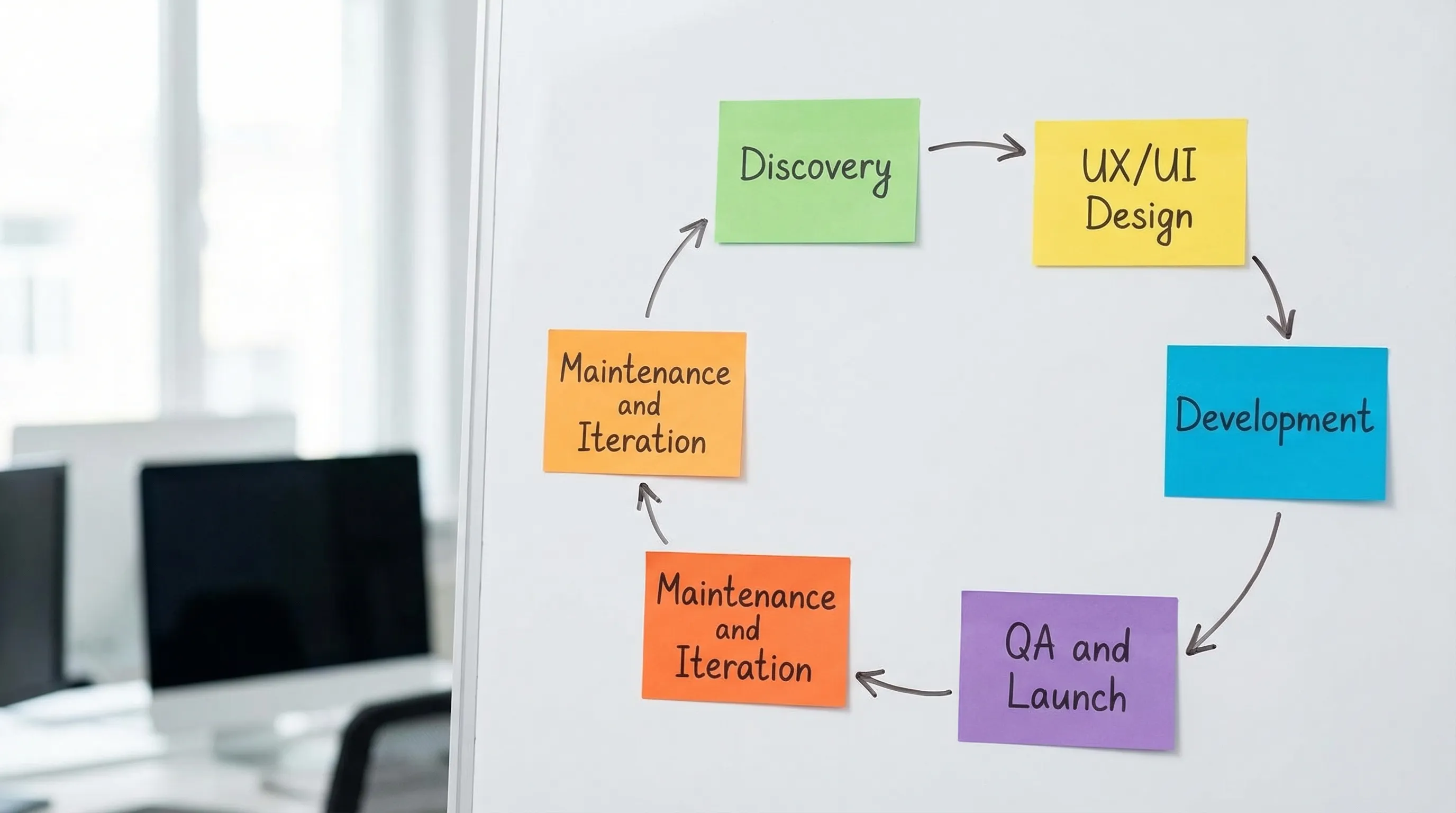
The process that reduces risk (what a well-run project looks like)
Most successful builds follow a predictable flow. If a vendor cannot describe their process clearly, your project may become the process.
Discovery that produces decisions
Discovery should end with documented decisions: target audiences, key pages, conversion goals, integrations, and constraints. If discovery is skipped, you will pay for it later in rework.
Design that anticipates content and responsiveness
Strong design is not just "how it looks." It includes:
- Mobile, tablet, and desktop behavior
- Realistic content (long headings, real images, error messages)
- Component-based thinking (reusable sections)
Development with environments and QA
Professional teams use separate environments (development, staging, production) and have a QA approach. For web applications, ask about testing depth for critical flows (login, checkout, form submissions).
Launch that protects SEO and tracking
Launch is where otherwise good projects lose traffic and data.
Ask for:
- A redirect plan (especially if URLs change)
- Analytics validation (events firing correctly)
- A rollback plan if something fails
Pricing: how web development services are quoted (and how to compare fairly)
Proposals can look wildly different because vendors package risk differently. Focus on the pricing model and what it assumes.
Common pricing models
Fixed project fee
- Best for well-defined scope.
- Risk: change requests can become expensive.
Time and materials (hourly)
- Best for evolving scope or app development.
- Risk: without tight management, costs can drift.
Retainer (monthly)
- Best for ongoing improvements, maintenance, and marketing iteration.
- Risk: unclear priorities can waste cycles.
What drives cost (and what is often underestimated)
- Content work (migrations, rewriting, formatting)
- Integrations (CRM, payment, inventory, analytics stack)
- Quality requirements (accessibility, performance, testing)
- Stakeholder load (more reviewers means more coordination)
- Post-launch support expectations
When comparing bids, ask each vendor to list:
- Assumptions (what you provide vs what they provide)
- What is explicitly out of scope
- Change-request process
That is usually where "cheap" becomes expensive.
Red flags to watch for before you sign
Some red flags are about capability, others are about fit.
- No mention of maintenance: websites are software. If updates and monitoring are ignored, risk rises every month.
- Vague SEO promises: "We will rank you #1" is not credible. Look for technical SEO fundamentals and measurement.
- No performance plan: speed problems are costly to fix after launch.
- Unclear ownership: if you cannot access hosting, analytics, or admin accounts, you are locked in.
- No clear QA: "We test it" without specifics often means minimal testing.
Questions that quickly separate strong vendors from weak ones
Use these questions in sales calls. The goal is not to trap anyone, it is to understand how they think.
- What would you need from us to avoid delays? (content, approvals, subject-matter access)
- How do you handle redirects and SEO when launching a redesign?
- What is your approach to performance and Core Web Vitals?
- How do you secure admin access and handle updates?
- What does "done" mean for you? (acceptance criteria)
- What happens after launch if something breaks? (warranty, response time)
You are listening for specifics, not buzzwords.
Don't forget the "boring" stack: hosting, email, and maintenance
Many website failures are not design failures. They are operational failures.
Hosting and reliability
Good hosting choices depend on your site type (simple marketing site vs custom web app), traffic patterns, and compliance needs. At a minimum, ask who is responsible for:
- Uptime monitoring
- Backups and restore testing
- SSL certificates
- Deployments and rollbacks
Professional email
If you are switching domains or replatforming, email is often impacted (DNS changes, SPF/DKIM/DMARC setup). Treat professional email as a first-class requirement if your business depends on deliverability.
Maintenance as part of total cost of ownership
Web development services should include a plan for updates, security patches, and ongoing improvements. For CMS-based websites, regular updates reduce exposure to known vulnerabilities and plugin conflicts.
A practical way to make the final decision
When two vendors seem similar, use a simple weighting approach:
- Delivery confidence (process clarity, timeline realism)
- Quality plan (performance, accessibility, security)
- Fit for your project type (marketing site vs web app)
- Ownership and transparency (access, documentation)
- Post-launch support (maintenance options, response expectations)
The best partner is rarely the one with the most features in the pitch deck. It is the one whose proposal makes risk smaller.
When it makes sense to hire a full-service partner
If your business wants one accountable team for build plus operations (hosting, professional email, ongoing website maintenance), a full-service partner can reduce handoffs and finger-pointing.
Bildirchin Group is a digital agency serving businesses since 2010, providing custom websites, web applications, hosting, professional email, and ongoing support. If you want a single team to handle both delivery and long-term care, you can start a conversation here: Bildirchin Group web development services.

Final takeaway
Buying web development services is less about picking a popular tech stack and more about buying clarity: clear scope, clear deliverables, clear ownership, and a realistic post-launch plan. If you demand those elements in proposals and sales calls, you will make better decisions even before the first line of code is written.